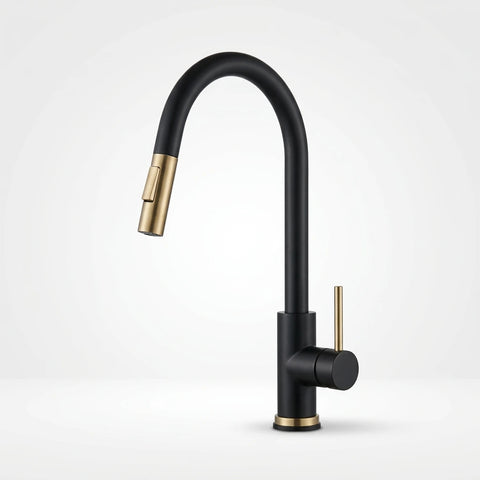

Touch and Sensor Kitchen Faucets: How They Work and What to Expect
Picture yourself holding a mixing bowl with both hands at the moment you want the water to stop. Can you touch the side of the spout with your forearm? Can you spare a hand to wave again? Or should lifting the bowl away be enough? Those are three different requests of a kitchen faucet. A touch faucet recognizes contact with a designated surface. A touchless faucet recognizes a hand or object in a particular space. What happens when you leave that space, how you set the water temperature and whether you can get water during a power failure depend on the model and its controls.
Quick answers
- For hands covered in dough, look for a reachable touch surface or a genuine wave control. A button that changes the spray is a different feature.
- For short rinses, ask what ends the stream. A wave control can require a second gesture. A presence sensor can stop when the object leaves its field.
- For a household that shares the sink, find the temperature setting for sensor use. It can be the lever on the faucet or a separate preset on an older control box.
- For outages, identify the control box as well as the faucet. Two versions of the same Moen Arbor can give different answers about the handle when all power is gone.
Start with a sink that is safe to use
If the faucet is running beyond your control, keep people away from the stream. Use the normal stop control only if safe. If flow continues, close both fixture supply stops only if they are dry, accessible and safely away from electrical equipment. If the stops will not move easily, the cabinet is wet around any electrical part or the water could reach an outlet, keep clear. Have building maintenance or a plumber isolate the water from a safe location. For a wet outlet, damaged cord, sparking, heat or any shock sensation, stay away and have a qualified electrician make the area safe. Do not reach for a wet plug or touch the faucet to see if the fault is still present.
Active cabinet leaks, an unusually hot stream and a battery holder that is hot, cracked, swollen or leaking are also reasons to stop. Keep children away. Leave a damaged pack alone and contact the manufacturer. If someone may have been shocked or seriously burned, get urgent medical help. Kohler's Sensate installation guide requires a protected electrical circuit and disconnected power for service. The Consumer Product Safety Commission warns that hot tap water can cause severe burns. The comparisons below are for shopping and for using the normal controls of an intact, dry installation. There is no need to disconnect a hose or interrupt power to identify the style.
What happens after your hand moves away?
Imagine holding a colander full of berries. On the Moen Arbor dual sensor example, a pass over the top sensor starts the stream. You can lower the colander into the bowl and rinse with both hands. Taking the berries away leaves the stream running until you use the stop gesture or the faucet reaches its own automatic limit. The front sensor on the same faucet follows a different rule. Moen calls it the Ready Sensor. An object presented in its field starts the water. Taking the object clear ends that demand. If you want one brief rinse without a second gesture, the front sensor is the one to look for.
Now swap the colander for a heavy pot. If your pot remains in front of the ready sensor, moving your hand away may change nothing. The sensor can still see the pot. On a wave control, it is natural to think that the first wave gives you time to fill the pot. It does, but you must stay there to stop the flow. Moen's illustrated identification guide shows dual sensor versions with both a top and a front window. Its one sensor Wave version has a side window. A polished faucet with one dark window should never be sold to you on the strength of a demonstration of the other one.
A touch model offers another choice. The chrome Delta Leland numbered 9178T DST responds to a brief tap on the spout or handle with the handle set open. You can keep your fingertips off the lever and use a clean forearm against an accessible sensing surface. Holding the spout to swing it across the sink is a different motion, and Delta describes touch and grip recognition for this model. Plan around an intentional brief touch. A grasp on the handle can itself start flow on this version. There is little advantage to touch activation if the only spot you can reach is the spray button on the removable head.
Two almost identical model numbers show how much the letters matter. Delta's chrome Leland 9178TL DST adds detection near the faucet. The user guide describes capacitive sensing with a hand within four inches in its combined mode, and a selectable touch only mode. The combined mode responds to a person. Setting a metal bowl there by itself gives this faucet no start command, and lifting it away gives no stop command. The 9178T DST literature describes contact. A purchaser who needs water with absolutely no contact should ask for the full model code and the instructions for the desired mode. A person who wants deliberate touch in a busy food prep area should ask whether an extra proximity function can be disabled on the exact item.
Give the sensor a place in your kitchen
Before shopping, put your usual dish rack, soap dispenser, cutting board and largest daily pan where they normally sit. Leave the faucet off. Move an empty pan through your ordinary routine, from resting it over the drain to carrying it to the stove. Notice where a hand is free, how high you can reach comfortably and which part of the spout you would touch. A dry rehearsal is enough. You are looking for a place to give the intended command while keeping any accidental one out of the motion you already make.
For example, a soap pump might sit directly behind a top wave sensor. Drawing your hand toward the sink to get soap would take it through that space every time. Moving the pump to the side could solve the problem without changing your faucet choice. A wall shelf, an immovable dispenser or someone who can reach the pump only from the front changes that answer. A side control on the clear side or a touch surface near the bowl may suit that layout better. A published sensing range for one model cannot tell you where another model's window looks.
Think about two people working together. While one holds a bowl under the spout, the other might reach past it for a towel. A toggle responds to the next recognized command regardless of who gives it. A ready sensor may keep the stream on because the first person's bowl is still present. Ask the person who cooks with you to walk through the dry motion, then reverse roles. If both people can name the stop action without shifting a full bowl, you have learned something a finish sample cannot show.
Reduced hand strength presents a slightly different question. A light touch on a reachable fixed arch might be comfortable, yet changing the mix might still require a firm grasp on a lever at the back of the sink. A visible wave window might be easy for a standing cook and awkward for someone seated. Evaluate the normal start, stop and temperature adjustment from the actual user's position. Have the seller show where the controls are relative to the deck. If a comfortable reach depends on leaning over a full or hot pan, choose a different control position.
Who sets the temperature and water volume?
The action that opens the stream need not choose its temperature. In Delta's instructions for the touch Leland, the lever sets the mix and volume. Tapping can interrupt the flow while leaving that lever in place. When the next person taps for water, the setting may still be the one used for cleaning the roasting pan. A colored temperature indicator gives information about the water. It does not select a cooler setting for the next user or guarantee that the first water out will stay the same temperature.
Kohler's operating instructions for the Sensate 72218 show the handle opening outward, then the user selecting the mix with it. With the handle open, a pass beneath the arch pauses the water. Another pass restarts it. Returning the handle upright closes it, which Kohler recommends for extended periods out of use. That is a useful distinction for households with visitors. A quiet sink can mean either the lever is open and the sensor is waiting or the lever is closed. For a guest who expects a wave to work, point to the lever position before blaming the electronics.
An older Moen Arbor shows why a demonstration should use both the lever and the sensor. In the gray control box version of the dual sensor 7594ESRS, Moen's early instructions show a small dial under the sink for the hands free mix. The handle adjusts the water during ordinary manual use. Someone might like the temperature from the handle and still find the sensor rinse too warm. Moving the handle and showing only the manual stream would miss the complaint. The later all black dual sensor control box uses the lever position to set the sensor mix, even with the handle in its off position. Moen illustrates the two controls in its temperature reference.
If temperature matters for a child, a guest or someone with limited sensation, use a cold starting setting and keep hands clear of the outlet until the water is known to be suitable. Water already in the pipe can arrive before the newly selected mix. If the setting is hard to identify or water remains unexpectedly hot, stop using that mode and get the installer to identify the control and correct the problem. A remembered mix is a convenience. A scald protection claim would need separate evidence for the exact fixture. A blue light in a picture is no basis for one.
How will the faucet stop when the sink is busy?
Choose the normal stop action first. The timer is a backstop. Delta lists four minutes for the touch Leland example. Kohler's Sensate 72218 operating instructions also describe a four minute limit after inactivity. Neither timer can tell whether a mug is full, a chopping board is blocking the drain or the spout is pointing over the counter. At a sink with a dishpan in the bowl, even an open drain below the dishpan cannot empty the water caught by the pan. Keep the outlet over the bowl and stay with every fill.
It is easy to misread a timed stop. Suppose the stream always stops after a long, uninterrupted fill, while it reliably starts and stops when commanded during short rinses. The time in the exact operating guide is a useful comparison. Suppose instead that the water cuts off as you turn a large bowl, then returns when the bowl moves back. With a ready sensor, the bowl may be crossing the edge of its field. Those observations call for different choices. For a long job you may prefer a documented wave or lever mode, provided you can stop it promptly yourself.
A spray selector changes the outlet pattern. A pause control on some spray heads can interrupt water while you hold it. Neither description tells you that the whole faucet has switched off. After rinsing two sides of a pan, use the fixture's actual stop command with the outlet over the sink. Look for the end of sustained flow. If the stream starts again without the intended command, finish using the normal handle if the manual calls for it and it is safe to do so. Repeated uncommanded starts warrant service. Avoid trying to cure them by covering windows or holding a button down.
What will happen if power goes out?
There are two different losses to plan for. The house might lose electricity while the faucet still has healthy batteries. Or the faucet itself might have no usable power because its only supply has failed. Ask the seller to describe both. A faucet running solely on batteries does not lose its own battery power because the lights go out. Water must still be available from the building. A house supplied by an electric well pump can also lose water pressure during an outage. A working faucet handle cannot manufacture a supply that has disappeared.
Moen's parts book for the stainless Arbor 7594ESRS includes multiple control assemblies. Its identification guide pictures an older gray box with six hoses and a later all black box with three. The older quick start guide, for equipment using the 163712 adapter option, describes continued ordinary handle operation when its batteries or electrical source fail. Moen's power guide for the later box, which lists adapter kit 169031, requires a power source for handle use as well as sensor use. The 2019 parts book even lists 169031 on more than one version, so an adapter number alone cannot identify the valve. Look at the box and its hose arrangement.
The Kohler Sensate 72218 is another arrangement. Its specification drawing shows an AC supply and the location of a manual bypass on the control assembly. Kohler describes a manufacturer provided override for loss of power, after which the handle controls the faucet. Someone who cannot reach the control assembly could own a model with a documented fallback and still have no usable fallback alone. Ask where the installer would place the control and who could safely use it. For an unknown unit, have the maker identify the proper procedure. Do not pull power to discover the valve position or improvise a bypass.
Cabinet storage changes that buying decision. Pull out a bin or recycling tray as you normally would, with the sink area dry and without touching the hoses. Consider where a battery holder would open and where the pull down hose moves. One installation might leave a clear path from the cabinet door to the holder. Another might put it behind a disposal with no room to grip the cover. Ask for the planned location and the clearance needed for service before agreeing to the installation. An outlet serving a disposal may be switched. Kohler specifies an unswitched protected supply for this Sensate. A qualified electrician should evaluate any electrical work.
When choosing battery operation, ask for the cell size, count, allowed chemistry, the low battery signal and whether the set can be changed without altering the water connections. Have the seller show the instructions for your kit. An estimated service life is a planning figure. The warning a person can see and the holder they can reach matter on the day it actually needs service. A health concern, a wet compartment or signs of battery damage take the job out of normal battery replacement. Leave the faucet out of use until it is checked and keep loose cells away from children.
Read what the selected listing actually shows
Home And Tower's collection currently contains the Albert Nordic faucet in four finishes. On the Black selection, the gallery photo shows the black arch and a hand at the curved spout. In the product description, an animated black faucet carries a touch on label and shows contact at the arch. Another image shows the detached spray head washing a plate. Taken together these identify the depicted touch location and the pull down function. Two outlet modes describe what leaves the head. They do not tell you if a passing hand can start water in midair.
The listing also uses the word touchless. It supplies no operating sequence that identifies a separate wave zone or says the faucet stops when an object leaves. The Brushed Gold selection changes the finish shown in the chosen image. The shared black demonstration and the package photograph do not establish different electronics for that finish. If no contact is a requirement, ask for an operating sheet matched to the selected finish and package, showing the exact gesture, the stop action and what the handle must do. Leave the wave feature undecided until you have that answer.
A name on a retailer page can point to the right faucet and still leave a specification unresolved. The Home Depot listing for the stainless Sensate 72218 VS highlights a wave under the arch. Its attached installation guide identifies the 72218 and explains the open handle and override. Kohler's older specification for this same base model listed a maximum of 1.8 gallons per minute at 60 psi. Its current US specification lists 1.5 at the same pressure. Do not carry the old fill rate into a new purchase merely because the spout looks familiar. Match the revision to the offered unit and judge the gesture separately from how quickly it can fill a pot.
Try three daily jobs before deciding
Breakfast with a narrow glass. Can the glass stand securely under the outlet while a free hand gives the on and off commands? A ready sensor can be convenient if it reliably detects what you put there. Kohler points out that certain colors and clear objects can escape detection on its Sensate and calls for using a hand to check the wave function. A seller moving a hand over a clear tumbler has shown that the hand gave a command. Ask which object the demonstration is supposed to detect. If the glass must stay still while you support it, an independently reachable command may be easier.
A stockpot that needs both hands. Start by setting the empty pot in the bowl. Imagine it full. Can you give the stop command before taking its weight? A touch beside the arch might be ideal when your hands are free during the fill. If you must support the pot continuously, a ready sensor might stop as the pot moves, but only if it leaves the sensing area. Pick a normal stopping gesture you can complete while the pot still rests securely. If there is no stable landing place under the outlet, reconsider the spout reach or bowl fit alongside the electronics.
The last rinse before leaving home. Someone wipes the counter and puts a sponge away. Where does the cloth pass? Is the faucet still ready to take a command? Check the drawn lever position in the operating guide and learn the maker's cleaning or shutoff instructions. Keep the control area clear of the parked sponge. A model with an easily understood closed position may suit a shared rental kitchen better than a second sensing zone nobody needs. Tell guests how to finish using the faucet in one plain sentence they can put into practice.
Choose by the action you can repeat
For a deliberate tap, use the explanation of touch activation to identify the sensing surface before deciding where you will put your arm. For a contact free rinse, the sensor faucet answer helps you distinguish a wave from an object that must remain in view. If losing the kitchen sink during an outage would be a hardship, check the power requirements and match the installed controls. For a hard to reach cabinet, compare battery service intervals and warning signs before choosing the power option.
In the touch and sensor kitchen faucet collection, start with the finish you would actually buy. Ask for one demonstration of your ordinary rinse and one written answer about an outage for that configuration. If the seller can show only a different model, keep the unanswered feature off your shopping list for that item. A faucet that gives you the right water, then stops with a motion you can make while the bowl is still safely in the sink, is the one that has passed your test.